The presentation
Every client you manage. One Super Intelligence.
Madison walks through the whole presentation herself in about seven minutes. Below it are the unedited walkthroughs, then every point from the presentation, written out.
7 minutes, narrated by Madison. Demo figures come from a fictional MSP.
See it unedited
No edits and no script.
Raw walkthrough 1
The company, its opportunities, and dispatch
A live session on our New York demo environment, a fictional Midtown MSP serving funds and law firms. Madison reads the whole client base, shows where the money is, and routes incoming tickets in seconds.
Raw walkthrough 2
What you can't see one client at a time
The patterns that only appear when every client is read together: the same problem repeating across accounts, the single engineer everything depends on, and the risk nobody owns.
Madison Desktop
The same intelligence, running on a laptop
Madison as the whole computer, on a physical Dell laptop, not a virtual machine. You talk or type, and she opens the work, reads what is on the screen, and finds any file by what is inside it. About 2 minutes, filmed live.
The problem
IT runs on a ticket queue, one client at a time.
Every client is a silo
Health, risk and margin live in separate tools. Nobody sees the whole book at once.
The same problem, five times
The same ticket at five clients is one root cause, worked five separate times.
One person, a whole estate
A 40-person firm has one IT person, permanently stretched. A platform team never scales down to that size.
The market
What 1,061 MSPs told Kaseya.
Madison reads across the tools you already run. She doesn't replace them: Microsoft 365, Entra, Intune, Defender, Sentinel and Azure, plus your RMM and PSA, whichever you use.
Source: Kaseya, 2026 State of the MSP Report (1,061 MSPs, surveyed November 2025). No affiliation.
MSP Super Intelligence
Every client in one view.
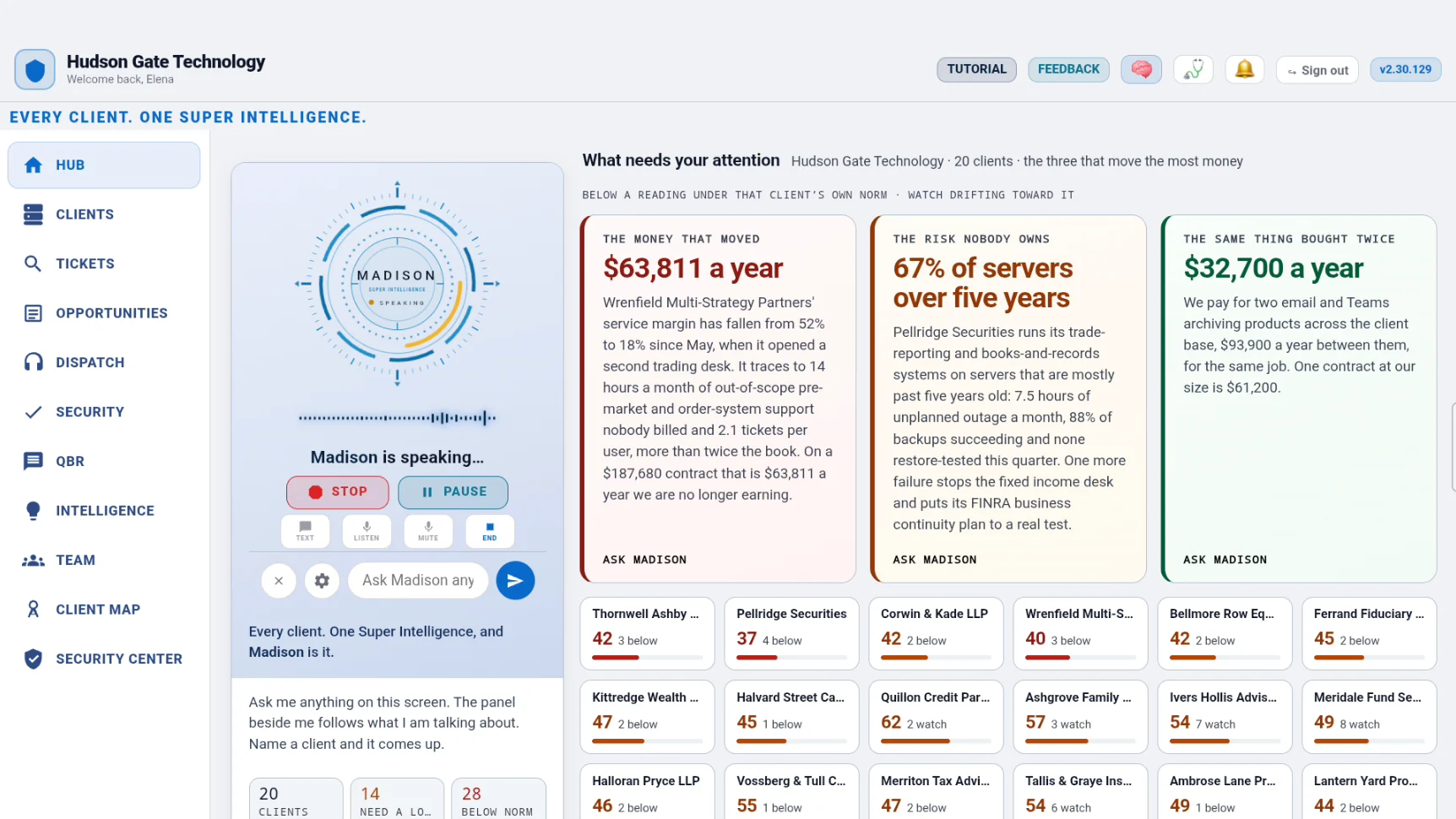
Every client, scored
Health, risk and margin, weighted by contract value.
Finds what repeats
The same ticket at five clients is one problem.
Projects to sell
Each one tied to the problem it ends.
Security, explained
Plain English, and a person approves every fix.
QBRs ready
A quarterly review per client, without the lost weekend.
Live desk
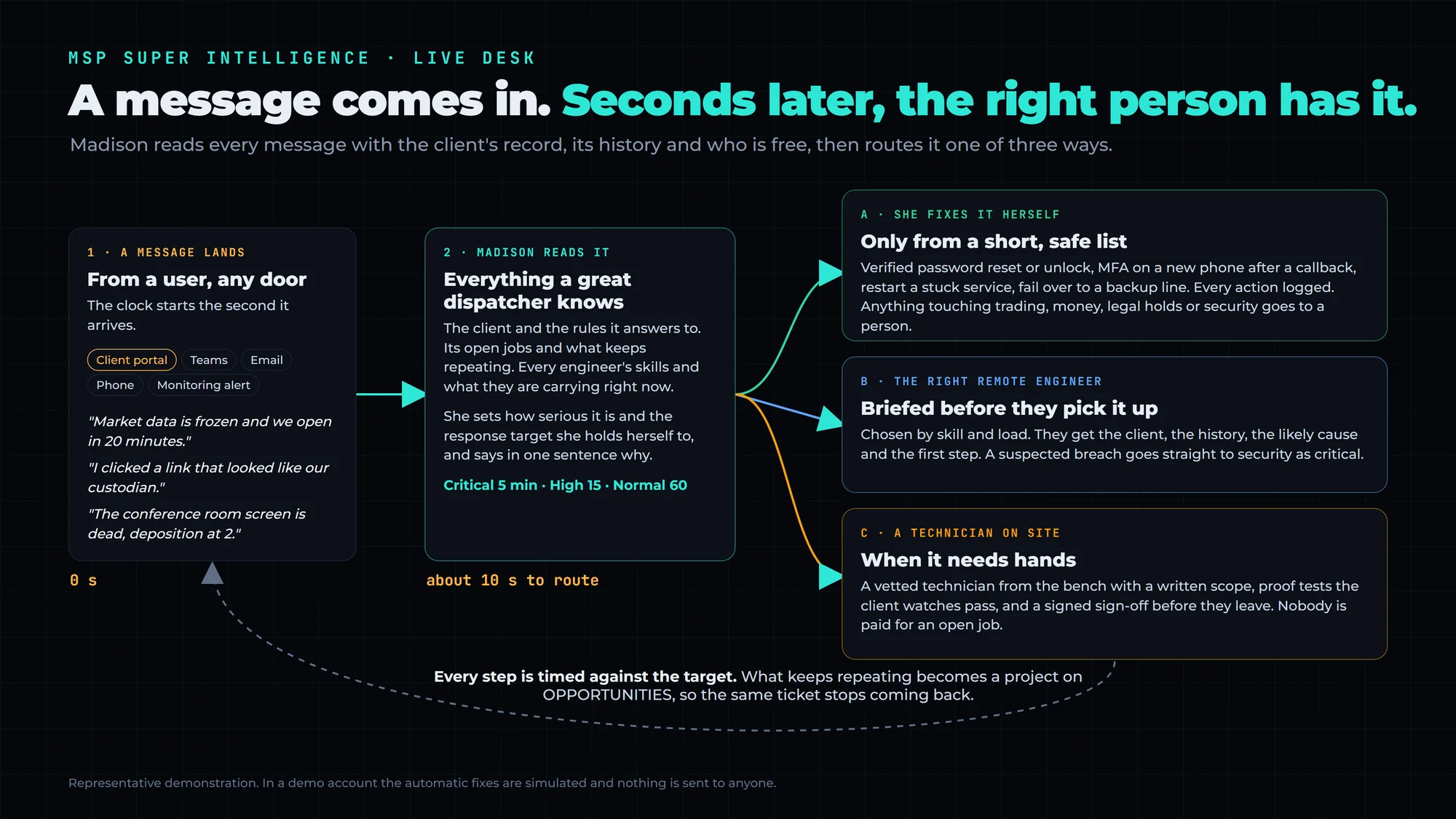
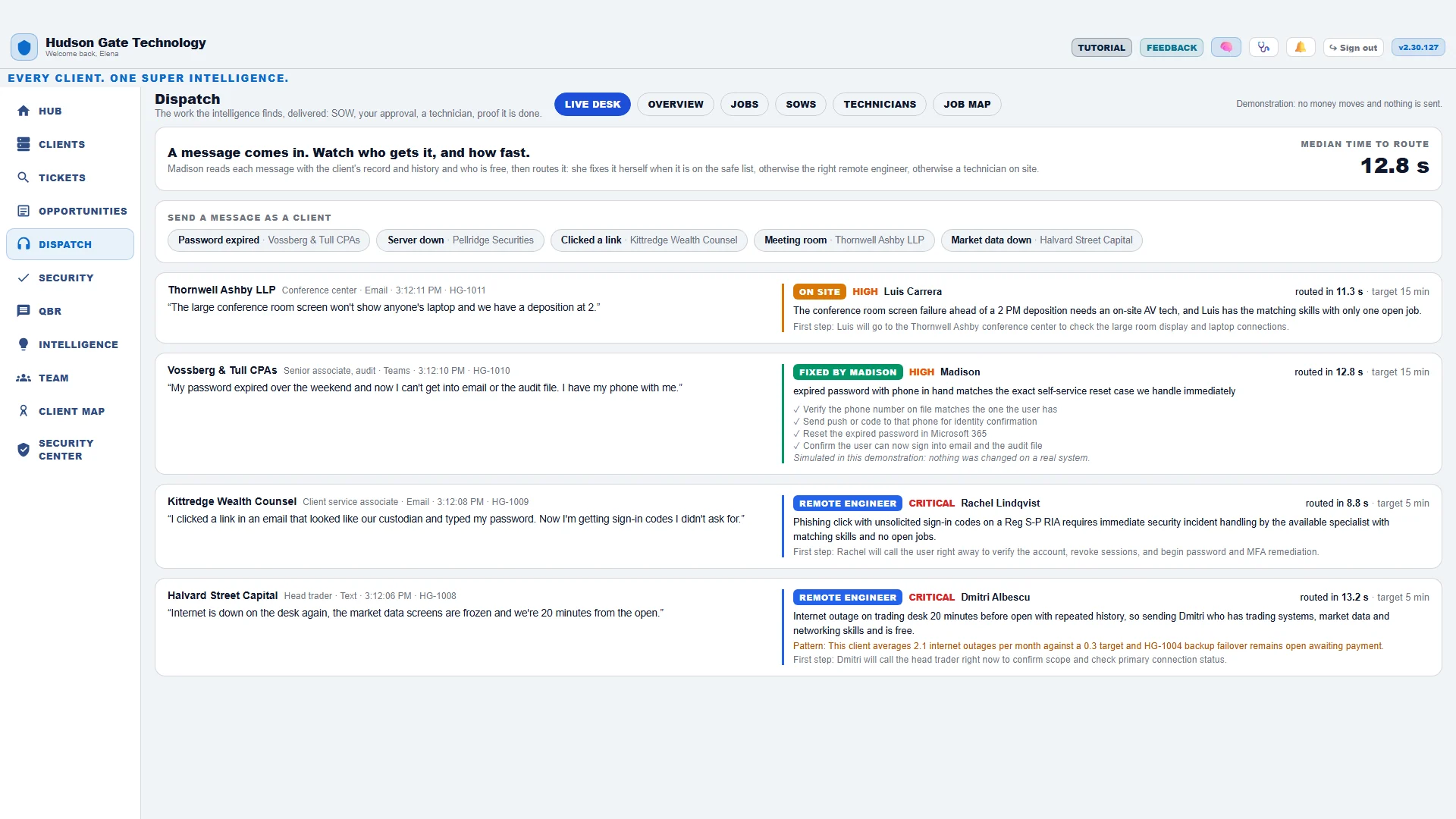
A message comes in. Seconds later, the right person has it.
The clock starts the second a message lands, from Teams, email, phone, text or a monitoring alert. Madison reads it with everything a great dispatcher knows, then routes it one of three ways: a fix from a short safe list she handles herself, the right remote engineer already briefed, or a vetted technician on site with a written scope. What keeps repeating becomes a project, so the ticket stops coming back.
On the wall
Put her on the wall. Ask her anything.
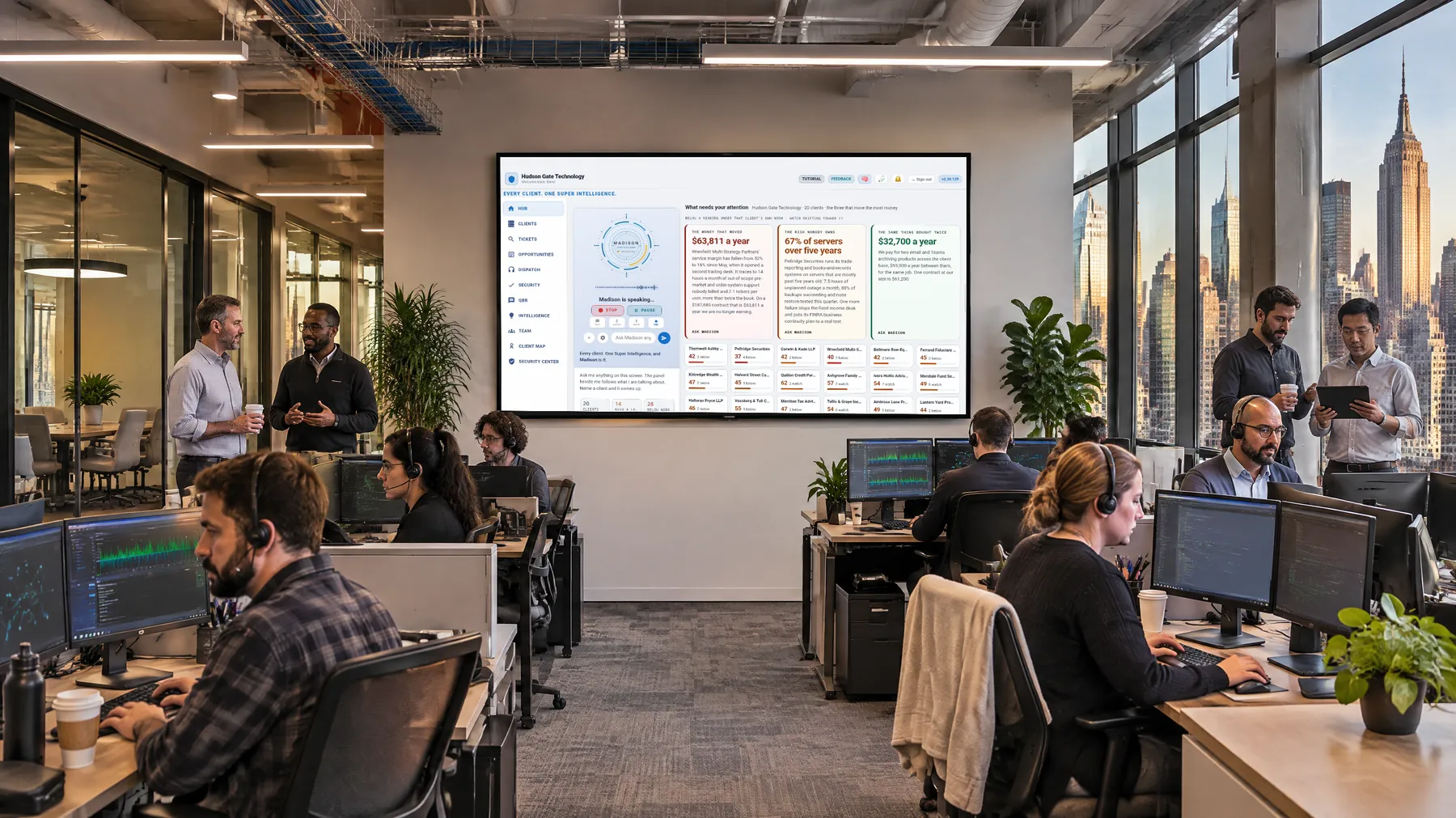
The whole client base, live
Every client, what moved and what needs a call, on the office screen.
Ask her across the room
Out loud, any time. She answers out loud.
Urgent alerts to your Teams
The right people get the ping in the channel they already live in.
Technicians have her too
On their phones, scoped to their own work.
The authority model
Capable enough to act. Mature enough to stop.
- Checksthe environment before she speaks.
- Recommendswith a time estimate and a backout.
- Waitsfor a person to approve.
- Actssnapshot first, abort on a failed probe.
- Proves ita full audit trail of every change.
Return on investment
Roughly 135 technician hours a month, back.
| Where the hours come from | Hours a month |
|---|---|
| Cross-client triage and reporting | 40 |
| Repeat tickets solved once | 50 |
| QBR preparation | 32 |
| Server builds | 12.5 |
| Total | 134.5 |
| 1,614 hours a year, at your rate | A year |
|---|---|
| $50 an hour | $81K |
| $65 an hour | $105K |
| $85 an hour | $137K |
| Billed to clients at $150 an hour | $242K |
Plus revenue: every repeat Madison finds becomes a project to sell.
Illustrative example: an MSP with 24 clients. Plug in your own rate; the assessment replaces every assumption with your numbers.
Time to value
Up and running in days, not weeks.
Most companies are still waiting. Only 6% get 5% or more of their earnings from AI, and McKinsey's own AI operating system work reaches first value in about 12 weeks.
- Day 1: ConnectKick-off. Read-only access to the systems you choose, with scoped keys.
- Days 2-3: LearnMadison learns your clients, tickets, standards and estate.
- Days 4-5: Go liveYour team talks to her: screens, voice, reports and QBRs.
- Every week afterShe learns from the work; new connections are added by API.
Why it's fast: a new customer is configuration, not a software project. The brain, the screens and the voice already exist.
Typical once access is granted. Larger estates are scoped in the assessment. 6% and 12 weeks: McKinsey & Company, "The AI operating system" and The State of AI, 2026. No affiliation.
Integrations
If it has an API, Madison can work with it.
CRM
Salesforce, HubSpot, Dynamics 365
PSA and ticketing
ConnectWise, Autotask, HaloPSA
RMM and monitoring
Agents, alerts, uptime
Microsoft 365 and Entra
Users, sign-ins, licences
Security
Defender, Huntress, EDR feeds
Cloud
Azure, AWS, Google Cloud
Virtualization
Hyper-V, VMware, Kubernetes
Communication
Email, calendar, phone, Teams
Product names are examples, not a certified list. Each connection is scoped in the assessment.
Where it runs
Your environment, your choice.
Hosted
We run Madison for you. Fastest start, and where a pilot begins. Your systems connect over secure APIs.
Your Azure tenant
Your subscription, behind your Entra ID, with Azure OpenAI in your region. Or a VM on your own Hyper-V or VMware.
Offline appliance
No internet route at all. Phones reach her through one encrypted tunnel to your firewall.
The same authority model everywhere: she proposes, and a person approves every change.
Next steps
See it on your own estate.
- AssessmentA scoping conversation: your clients, your stack, your APIs.
- Written proposalPriced to your environment.
- Go liveUp and running in days. Your team talks to Madison.